Part of the series “SQL Techniques You Should Know”
If there is one SQL keyword that causes more fear than any other, it’s DISTINCT. When I see it in a query, I immediately start to worry about just how much work I am in for to ensure the correctness of that query. I start scanning for comments to describe why it is there, and if none are found, I know the query is probably going to be wrong.
I have seen DISTINCT used to hide bad joins, missing grouping, and even missing WHERE clauses. I have seen developers use it as a “fix-all” for data problems.
In this blog, I will look at the proper use and distinctly dangerous uses of DISTINCT and also show how you might test your query that uses DISTINCT to see what it is actually covering up.
And in every example, I promise a comment explaining why we need DISTINCT.
The good
First off, there are valid uses of DISTINCT. One that everyone can use is to find permutations of values that are unique in a table that don’t really merit their own table. For instance, in the AndventureWorks database, the PRODUCT table has a Color column that contains various colors of the products that the fine folks at the AdventureWorks shop sell..
For example, if I want to get a list of all the colors that are actually used in the table, I could write the following query:
USE AdventureWorks2025
GO
SELECT DISTINCT Color --DISTINCT Color values use in the table
FROM Production.Product;
This construct is used often and is perfectly legitimate. It’s one of the most basic things you can do in SQL and is a great way to get a distinct list of values from a column or set of columns. The following query answers the question “What color products were ordered on certain days?”:
SELECT DISTINCT OrderDate, Color
FROM   Sales.SalesOrderHeader
        JOIN Sales.SalesOrderDetail
            ON SalesOrderHeader.SalesOrderID =
               Sales.SalesOrderDetail.SalesOrderID
        JOIN Production.Product
            ON Sales.SalesOrderDetail.ProductID =
               Production.Product.ProductID
WHERE Color IS NOT NULL;
Sure, the query is sort of nonsensical, but it’s just here to illustrate what you might do with DISTINCT. This pattern of using DISTINCT to remove duplicate rows from a result set is useful in certain scenarios.
Why not GROUP BY?
Sometimes you see a query like the following, which does technically return the same data.
SELECT OrderDate, Color
FROM   Sales.SalesOrderHeader
        JOIN Sales.SalesOrderDetail
            ON SalesOrderHeader.SalesOrderID =
                    Sales.SalesOrderDetail.SalesOrderID
        JOIN Production.Product
            ON Sales.SalesOrderDetail.ProductID =
                Production.Product.ProductID
WHERE Color IS NOT NULL
GROUP BY OrderDate, Color;
Both queries return the same rows, and they both have the same query plan:
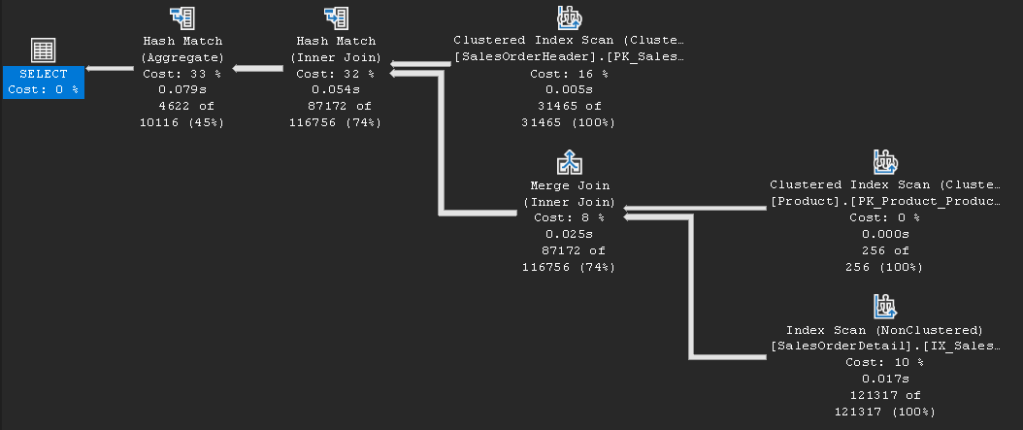
But GROUP BY should always be used for grouping data, and DISTINCT when you need to see unique rows. The biggest concern when using DISTINCT is what are you distincting away. When you are trying to diagnose duplicated data, you will typically start with a GROUP BY with an aggregate, usually to show how many duplicates:
SELECT OrderDate, Color, COUNT(*) --Usually at least a count
FROM   Sales.SalesOrderHeader
        JOIN Sales.SalesOrderDetail
            ON SalesOrderHeader.SalesOrderID =
                SalesOrderDetail.SalesOrderID
        JOIN Production.Product
            ON SalesOrderDetail.ProductID =
                Production.Product.ProductID
WHERE Color IS NOT NULL
GROUP BY OrderDate, Color
HAVING COUNT*) > 1; --and now cases of 1 or more
Use DISTINCT when you know there are duplicates that you need to output. It (plus those comments you are absolutely adding!) signals that you know there are duplicates, they are okay, and you need the set of values. Then use GROUP BY to aggregate, count, etc those duplicates.
This is why we shudder at the sight of DISTINCT
In the following query, see if you can easily see the issue?
SELECT OrderDate, Color
FROM   Sales.SalesOrderHeader
        JOIN Sales.SalesOrderDetail
            ON SalesOrderHeader.SalesOrderID =
                SalesOrderHeader.SalesOrderID
        JOIN Production.Product
            ON Product.ProductID =
                SalesOrderDetail.ProductID;
It isn’t a super complex query, so you probably see the issue, but I won’t give it away just yet. Grabbing a few rows from this output, you should be able to see pretty quickly that there is some data that is being duplicated.
OrderDate               Color
----------------------- ---------------
2022-05-30 00:00:00.000 Black
2022-05-30 00:00:00.000 Black
2022-05-30 00:00:00.000 Black
2022-05-30 00:00:00.000 Black
2022-05-30 00:00:00.000 Black
So, like any good employee, let’s assume that these are correct results, so let’s add DISTINCT so we can move on.
SELECT DISTINCT OrderDate, Color
FROM   Sales.SalesOrderHeader
        JOIN Sales.SalesOrderDetail
            ON SalesOrderHeader.SalesOrderID =
                SalesOrderHeader.SalesOrderID
        JOIN Production.Product
            ON Product.ProductID =
                    SalesOrderDetail.ProductID;
Did I mention that the version of the query without DISTINCT returns 3,817,239,405 rows. (It overflowed an int counting the number of rows so I had to use COUNT_BIG to count the results. The version of the query with DISTINCT? A “feels good” 10116 rows.
OrderDate               Color
----------------------- ---------------
2023-02-09 00:00:00.000 Silver
2023-04-21 00:00:00.000 Silver
2024-01-07 00:00:00.000 Silver
2024-12-04 00:00:00.000 Silver
2023-03-04 00:00:00.000 Silver
2024-01-30 00:00:00.000 Silver
2024-12-27 00:00:00.000 Silver
I got a time value and a color value that were output. Sweet. But…is it right? Not even in the slightest (there are not 3.8 billion rows in this sales data! Testing by “feels” (an upcoming blog for sure) is always the first thing we do when writing queries that return a lot of data. You can easily feel that 3,817,239,405 rows of output is wrong. But the second output feels reasonable.
But that is why we don’t stop testing by feels. If you feel like you need DISTINCT, using GROUP BY with some aggregates can be a good way to verify your results
SELECT OrderDate, Color, COUNT(*)
FROM   Sales.SalesOrderHeader
        JOIN Sales.SalesOrderDetail
            ON SalesOrderHeader.SalesOrderID =
                SalesOrderHeader.SalesOrderID
        JOIN Production.Product
            ON Product.ProductID =
                SalesOrderDetail.ProductID
GROUP BY OrderDate, Color
ORDER BY COUNT(*) DESC;
The output from this query outputs the same number of rows as the DISTINCT.. but look at those COUNT(*) values:
OrderDate               Color
----------------------- --------------- -----------
2025-03-30 00:00:00.000 NULL            9253295
2025-01-28 00:00:00.000 NULL            8365525
2024-12-30 00:00:00.000 NULL            8331380
2024-10-29 00:00:00.000 NULL            8263090
2025-03-30 00:00:00.000 Black           8156829
2024-06-29 00:00:00.000 NULL            7921640
Hmm, 9.25 million rows is a few more rows than we have in our Sales.SalesOrderHeader table to start with:
SELECT COUNT(*)
FROM   Sales.SalesOrderDetail;
This returns: 121317
So yeah, always sanity check any query where you see a lot of duplicated rows, especially ones that you don’t really expect. In this case, you need to look at all of the code in the query:
SELECT OrderDate, Color
FROM   Sales.SalesOrderHeader
        JOIN Sales.SalesOrderDetail
            ON SalesOrderHeader.SalesOrderID =
                SalesOrderHeader.SalesOrderID
        JOIN Production.Product
            ON Product.ProductID =
                SalesOrderDetail.ProductID;
Then notice this join:
JOIN Sales.SalesOrderDetail
ON SalesOrderHeader.SalesOrderID = SalesOrderHeader.SalesOrderID
This is true in every comparison that is not null (all of them in this case). So you get a Cartesian product between SalesOrderHeader and SalesOrderDetail, meaning for each of the 121317 rows of the SalesOrderDetail table (the number of rows you are expecting), you multiply the number of rows by the rows in SalesOrderHeader:
SELECT COUNT(*)
FROM   Sales.SalesOrderHeader;
That returns 31465 and 121317 * 31465 gets us back to the 3,817,239,405 number from earlier.
So yeah, not good. Fix the JOIN criteria:
SELECT OrderDate, Color
FROM   Sales.SalesOrderHeader
        JOIN Sales.SalesOrderDetail
            ON SalesOrderHeader.SalesOrderID =
                SalesOrderDetail.SalesOrderID --fixed!
        JOIN Production.Product
            ON Product.ProductID =
                SalesOrderDetail.ProductID
And now this returns 121,317 rows, and you can see that that matches the 121,317 rows in SalesOrderDetail.
And then you can DISTINCT that:
SELECT DISTINCT OrderDate, Color --Just need permutations of
--OrderDate and Color
FROM   Sales.SalesOrderHeader
        JOIN Sales.SalesOrderDetail
            ON SalesOrderHeader.SalesOrderID =
                SalesOrderDetail.SalesOrderID --fixed!
        JOIN Production.Product
            ON Product.ProductID =
                SalesOrderDetail.ProductID;
Which returns 5031 rows, and you can test that with:
SELECT OrderDate, Color, COUNT(*)
FROM   Sales.SalesOrderHeader
        JOIN Sales.SalesOrderDetail
            ON SalesOrderHeader.SalesOrderID =
                SalesOrderDetail.SalesOrderID --fixed!
        JOIN Production.Product
            ON Product.ProductID =
                    SalesOrderDetail.ProductID
GROUP BY GROUPING SETS( (OrderDate, Color),());
Which will return 5032 rows, with the extra row being:
OrderDate               Color
----------------------- --------------- -----------
NULL                    NULL            121317
Summary
Every SQL programmer should know how and why to use DISTINCT. It is a very useful tool when you need it. It should never be used as a tool to eliminate duplicate data you didn’t expect to find in query results. It is meant strictly for when you know what you are expecting. You know there is some combination of column values that you want to get to see the output, and you know why they are repeated.
It is generally not a tool to find or remove duplicates in a set. Usually, duplication is not defined on an entire row. So if you have Customer 100, Name: Bob, ShoeSize 12; you may have Customer 100, Name: Bob, ShoeSize 12.5. DISTINCT won’t help you here if you need all three columns. Finding (and dealing with) duplicates is a topic that I will cover in a future post.





 Drsql.link
Leave a comment