So I was reading Brent Ozar’s post about Regular Expressions in SQL Server 2025 (T-SQL Has Regex in SQL Server 2025. Don’t Get Too Excited. – Brent Ozar Unlimited®) and why they work as they do, and in the comments, someone mentioned a couple of hints that should make it better. I couldn’t find much written on these hints, so I figured I would see what I could figure out.
The hints mentioned were: ASSUME_FIXED_MAX_SELECTIVITY_FOR_REGEXP and ASSUME_FIXED_MIN_SELECTIVITY_FOR_REGEXP. They work by adjusting the expected number of rows to be returned from a REGEXP operator based conditional.
Note: The original version of this blog did not do the filter correctly. This was changed from using \b in front and end of the string (which are word delimiters, not whole string ones), and replaced them with ^ in front and $ in the end, which means our string does calculate equality. The point of the article did not change even when the REGEXP_LIKE expression was clearly an equality condition.
My Object
The full script is repeated as an appendix of this post (it is the same as in this article: SQL Server REGEXP_LIKE features augment, not replace, LIKE, but I did add a name to the PRIMARY KEY constraint, and I cranked it up to 100000 rows instead of 1000. I again will add a couple of distinct readable values for the test:
INSERT INTO dbo.RegExTest(Value)
VALUES ('This is my first known value'),
       ('This is my second known value');
The most important thing to see about the table is that we have two indexes, and the one that will matter to this discussion is the Index on the Value column:
sp_help 'RegExTest';
And in the output, you can see the following information about the indexes:
index_name       index_description                                   index_keys
---------------- --------------------------------------------------- -------------
PK_RegExTest     clustered, unique, primary key located on PRIMARY   RegExTestId
Value            nonclustered located on PRIMARY                     Value
It is not unique, but let’s see how this works with the REGEXP_LIKE function and for fun, LIKE. Just like previously, I am only going to show a simple equality comparison. Let’s look a the plan and estimated cardinality for each query. Starting with a query that returns all rows:
SELECT Value
FROM RegExTest;
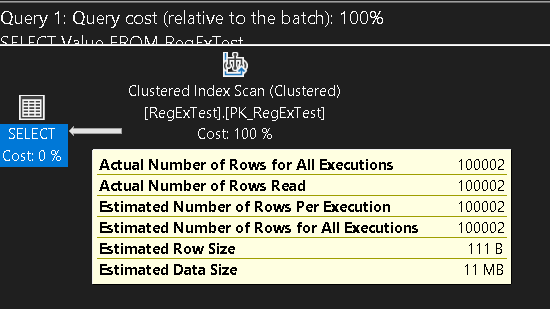
Easy enough, the estimate was 100002, and the actual was 100002. It did a Clustered Index Scan, which was interesting (and why I tried to increase the data to be a lot larger, but since I am only using the Value column, I sort of expected it to scan the Value index). It is a very small record size for each row, so that may be affecting the plan.
Now with a LIKE expression:
SELECT Value
FROM RegExTest
WHERE Value LIKE 'This is my first known value';
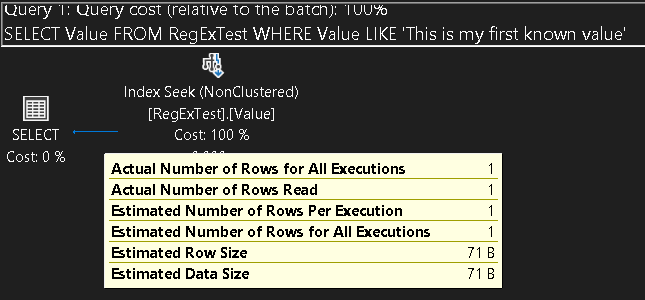
This time, the plan used only the Value index, with a cardinality guess of 1, and an outcome of 1. With the control tests completed, let’s look at the REGEXP_LIKE examples: First, with no hint, and the equality example that returns the same data as the LIKE based expression.
SELECT Value
FROM RegExTest
WHERE REGEXP_LIKE(Value,'^This is my first known value$');
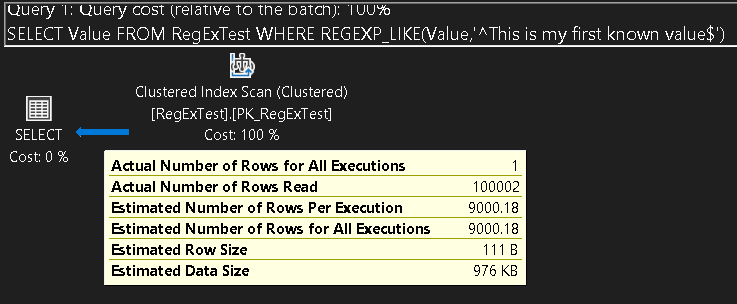
This took 6 seconds to execute on my home computer, which is pretty slow (and the whole point of my previous blog on the subject!). but what was the expected number of rows. In this case, on my 100002 row table, the guess was 9000.18.
The hints
If this estimate is not working well for you, you can adjust the estimates just a bit. If you want to take the largest possible number, you can use ASSUME_FIXED_MAX_SELECTIVITY_FOR_REGEXP:
SELECT Value
FROM RegExTest
WHERE REGEXP_LIKE(Value,'$This is my first known value^')
OPTION (USE HINT ('ASSUME_FIXED_MAX_SELECTIVITY_FOR_REGEXP'));
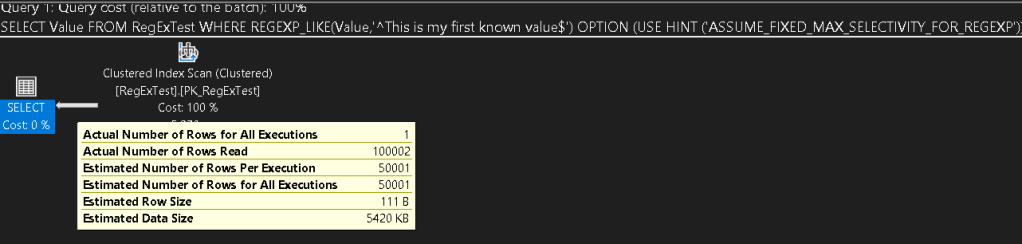
Again, I can tell this is not faster (yet, who knows what kind of performance increases may come as they work on these tools), but looking at the plan, you can see that the cardinality guess is a lot higher at 50001. This is half of the rows in my table, and while that may not be the actual algorithm, it has held true for the sizes that I have used this for so far.
That was the max, now we use the min: ASSUME_FIXED_MIN_SELECTIVITY_FOR_REGEXP. Execute the following query:
SELECT Value
FROM RegExTest
WHERE REGEXP_LIKE(Value,'^This is my first known value$')
OPTION (USE HINT ('ASSUME_FIXED_MIN_SELECTIVITY_FOR_REGEXP'));
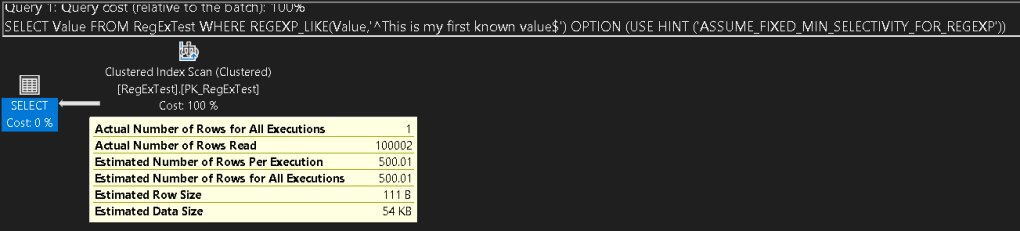
And now the estimated rows are down to 500.01. Even with this much lower estimate, it still did not scan the Value index as a covering query, so the actual performance in THIS case was the same.
Note: Estimates aren’t that important in a query of this size, but if you are creating a really large query, the difference between 500, 9000, and 50000 rows can change the actual plan that is chosen and how it will behave.
Finally, let’s force the query with the three cases and see if anything changes (when I created a UNIQUE index on the Value column, it did scan that index, but the cardinality estimates were the same).
SELECT Value
FROM RegExTest WITH (index = Value)
WHERE REGEXP_LIKE(Value,'^This is my first known value$');

SELECT Value
FROM RegExTest WITH (index = Value)
WHERE REGEXP_LIKE(Value,'^This is my first known value$')
OPTION (USE HINT ('ASSUME_FIXED_MAX_SELECTIVITY_FOR_REGEXP'));

SELECT Value
FROM RegExTest WITH (index = Value)
WHERE REGEXP_LIKE(Value,'^This is my first known value$')
OPTION (USE HINT ('ASSUME_FIXED_MIN_SELECTIVITY_FOR_REGEXP'));
Same cardinality estimates. The only difference was that now it does an Index Scan (Nonclustered) instead of a Clustered Index Scan. Add a unique index such as;
CREATE UNIQUE INDEX UniqueValue ON RegExTest (Value);
And you won’t need the hint to get the plan to scan that index, but it also will have the same cardinality estimates.
Conclusion
Hints, while generally not the greatest idea, are there for a reason. Complex queries and making them behave correctly. Most of the time, when you use REGEXP_LIKE (or any filtering of rows where a column is included in the function call), you are going to just going to expect the costs to be high (or include alternate filtering) because you are looking for something that LIKE cannot handle.
In some cases, this may mean that the typcal number of rows to be output is much higher or lower than the estimate, which could make your query run quite slow. These hints can help you with this. Just understand that whether you search for 1 value, or every value:
SELECT Value
FROM RegExTest
WHERE REGEXP_LIKE(Value,'.*')
OPTION (USE HINT ('ASSUME_FIXED_MIN_SELECTIVITY_FOR_REGEXP'));
The estimate for this and the other variations are the same, even though it will return all the rows in the table..
Appendix
Code to load the example data:
USE TempDb;
GO

SET NOCOUNT ON;

-- Drop the table if it exists
IF OBJECT_ID('dbo.RegExTest', 'U') IS NOT NULL
DROP TABLE dbo.RegExTest;

-- Create the table
CREATE TABLE dbo.RegExTest (
RegExTestId INT IDENTITY(1,1) CONSTRAINT PK_RegExTest PRIMARY KEY,
Value NVARCHAR(100) INDEX Value
);

-- Declare variables
DECLARE @i INT = 1;
DECLARE @chars NVARCHAR(62) = 'ABCDEFGHIJKLMNOPQRSTUVWXYZabcdefghijklmnopqrstuvwxyz0123456789';
DECLARE @len INT;
DECLARE @str NVARCHAR(100);
DECLARE @pos INT;

-- Loop to insert 100000 rows
WHILE @i <= 100000
BEGIN
SET @len = 10 + ABS(CHECKSUM(NEWID())) % 41; -- Length between 10 and 50
SET @str = '';

WHILE LEN(@str) < @len
BEGIN
    SET @pos = 1 + ABS(CHECKSUM(NEWID())) % LEN(@chars);
    SET @str = @str + SUBSTRING(@chars, @pos, 1);
END

INSERT INTO dbo.RegExTest (Value)
VALUES (@str);

SET @i += 1;

END;







 Drsql.link
Leave a comment